Overview
The Jira Subtask Board app runs in complete isolation from other apps, other Jira instances, and external systems. This document explains the multi-layered isolation architecture that ensures your data remains secure and private.
Key Principle: Each installation of the Subtask Board app operates in its own isolated sandbox. Your data never leaves Atlassian's infrastructure, is never shared with other customers, and cannot be accessed by other apps.
How Isolation Works
1. Atlassian Forge Platform Isolation

The Subtask Board app is built on Atlassian Forge, Atlassian's secure cloud app platform. Forge provides built-in isolation at multiple levels:
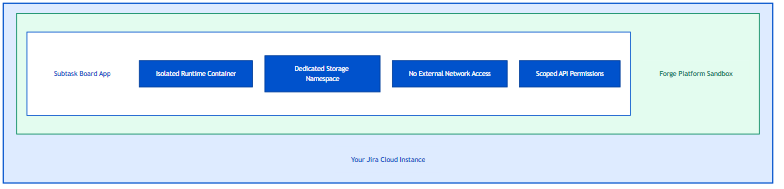
Isolation Layer | What It Does |
|---|---|
Runtime Isolation | App code runs in isolated Node.js containers with 256MB memory limits |
Storage Isolation | App data is stored in encrypted, namespaced storage only this app can access |
Network Isolation | App cannot make outbound requests to external servers |
Permission Isolation | App can only access Jira data through declared, approved permission scopes |
2. Per-Installation Data Isolation
Each Jira Cloud instance that installs the Subtask Board app gets a completely separate data store. There is no data sharing between installations.
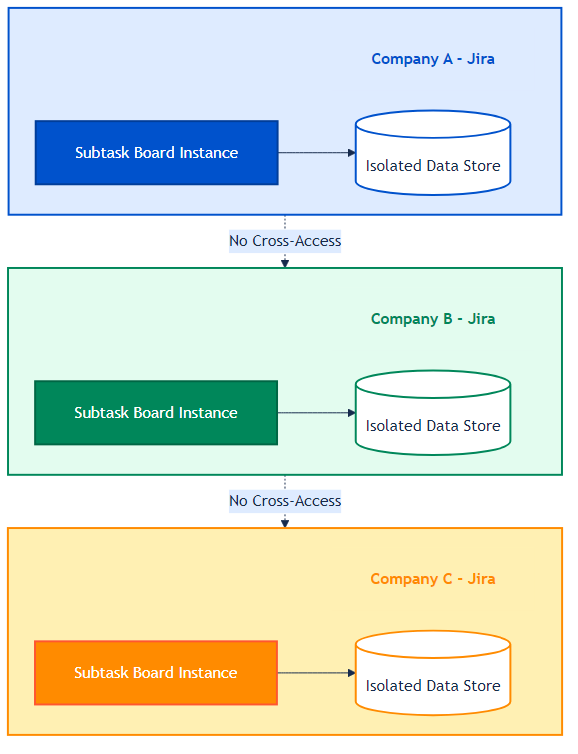
Guarantees:
Company A cannot see Company B's settings or data
Each installation has a unique identifier
Uninstalling the app removes all data for that installation
Data remains within your geographic region per Atlassian's data residency policies
3. Project-Level Data Isolation
Within your Jira instance, the app further isolates data by project and board:
Data Type | Scope | Who Can Access |
|---|---|---|
Global Settings | Your entire Jira instance | Jira Administrators only |
Project Visibility | Per project | Project Administrators |
Board Colors | Per project/board | Project members with view access |
Team Capacity | Per board/sprint | Project members with view access |
The app cannot:
Access data from projects the current user doesn't have permission to view
See private issues the current user cannot access
Bypass Jira's built-in permission schemes
Data Storage Architecture
Where Your Data Lives
The Subtask Board app stores data in three secure locations, all within Atlassian's infrastructure:
1. Forge App Storage (Global Settings)
Storage Key: global-settings
Contents: { enabledByDefault: true/false }
Access: App-level only
Encryption: Atlassian-managed encryption at rest
What's stored: The global admin setting for default app visibility.
Isolation: This storage is completely isolated per app installation. Other apps cannot read or write to this storage.
2. Jira Entity Properties (Project Settings)
Property Key: berecom.subtaskboard
Entity: Project
Contents: enabled | disabled
Access: Project administrators
What's stored: Per-project visibility overrides and board customizations (colors, display settings).
Isolation: Data is namespaced with com.berecom.subtaskboard.* prefix. Only this app can read/write these properties.
3. Forge Custom Entities (Board Data)
Entities:
├── team_availability (boardId, sprintId, userId, availableDays)
├── team_capacity (projectKey, capacity data)
├── board_color (boardId, columnId, color)
└── board_setting (boardId, settings)
What's stored: Team capacity planning data, custom column colors, board display preferences.
Isolation: Each entity is indexed by boardId or projectKey, ensuring data from one board/project cannot leak to another.
Security Architecture
Permission Model
The app uses Atlassian's Scoped Permissions model. This means:
Declared Permissions: The app must declare every permission it needs in advance
User Approval: Administrators approve these permissions during installation
Runtime Enforcement: Atlassian enforces these permissions at runtime
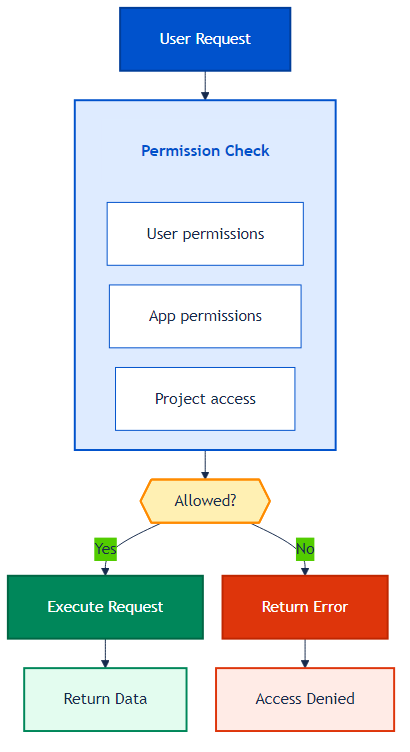
What This Means for Admins
Question | Answer |
|---|---|
Can the app see data I can't see? | No. The app operates under your user context. |
Can the app send data externally? | No. Forge blocks all outbound network requests. |
Can the app modify Jira settings? | No. It can only manage its own namespaced properties. |
Can other apps access Subtask Board data? | No. Storage is isolated per app. |
Runtime Isolation
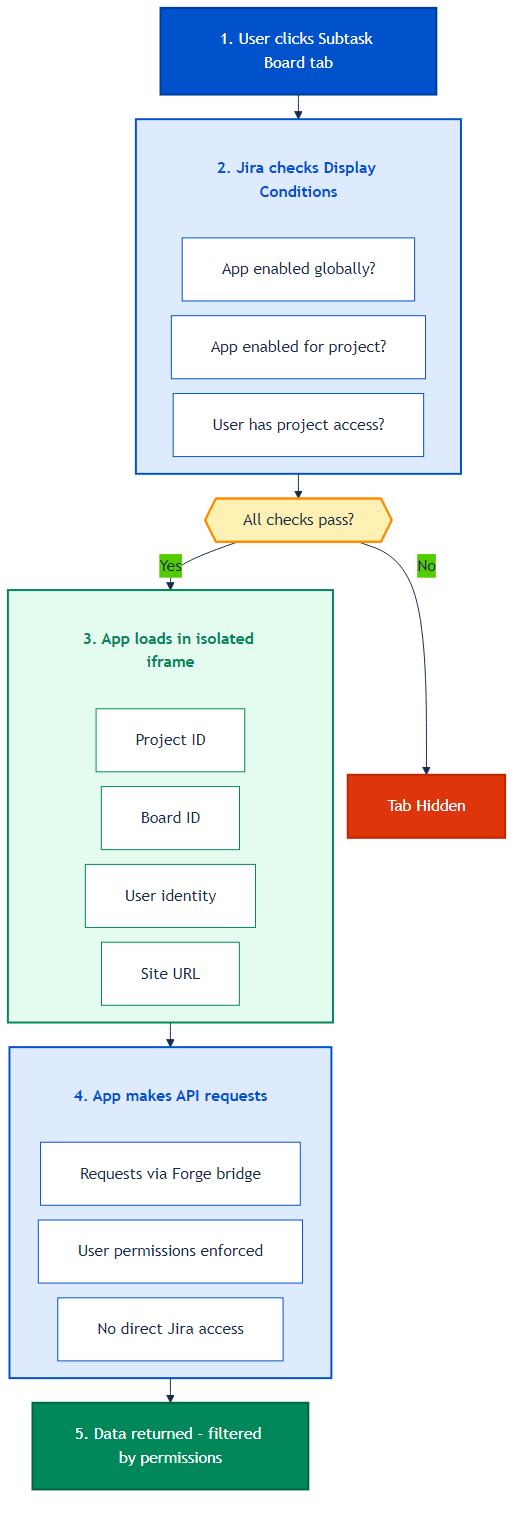
How Each Request Is Handled
When a user interacts with the Subtask Board, here's what happens:
Container Isolation
Each app execution runs in an isolated container:
Aspect | Specification |
|---|---|
Runtime | Node.js 20.x (ARM64) |
Memory Limit | 256 MB |
Timeout | Limited execution time |
File System | No persistent file access |
Network | No outbound connections |
If the app attempts to exceed these limits, Atlassian terminates the execution.
Administrative Controls
Three Levels of Control
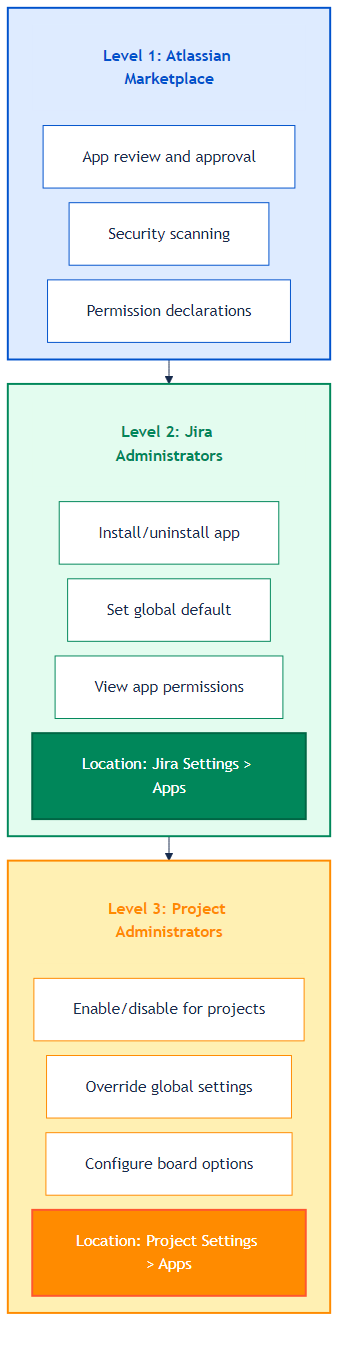
Visibility Control Matrix
Global Setting | Project Setting | App Visible? |
|---|---|---|
Enabled | Use Global Default | Yes |
Enabled | Always Enabled | Yes |
Enabled | Always Disabled | No |
Disabled | Use Global Default | No |
Disabled | Always Enabled | Yes |
Disabled | Always Disabled | No |
Data Flow Diagram
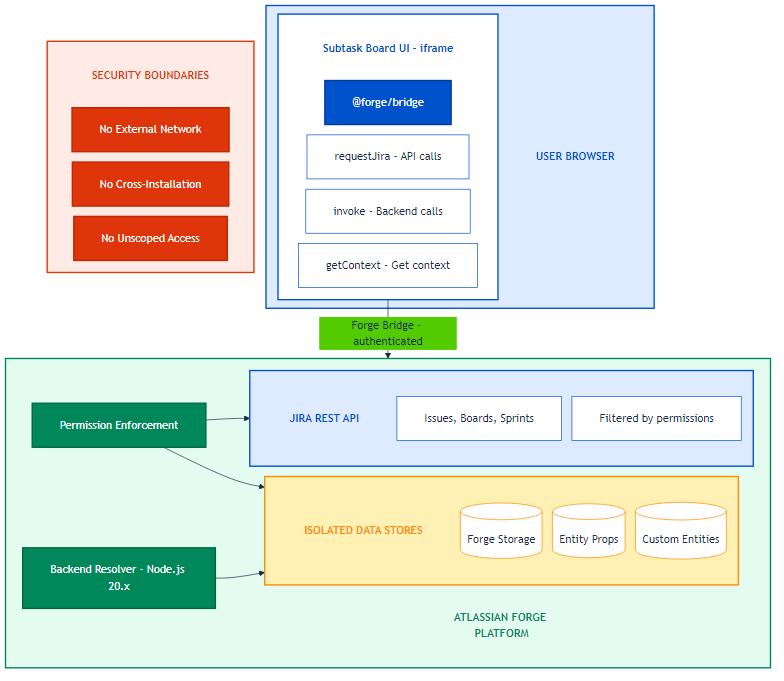
Key Security Boundaries:
No External Network Access
No Cross-Installation Data Sharing
No Unscoped Jira Access
Compliance & Audit
What Admins Can Verify
Permission Scopes: View all declared permissions in Jira Settings → Apps → Manage apps → Subtask Board (see: Permission Scopes of Subtask Board)
Data Residency: Data follows your Atlassian organization's data residency settings
Access Logs: Jira audit logs capture app-related activities
Atlassian's Security Measures
App Review: Forge apps published on the Atlassian Marketplace are subject to Atlassian’s app security and review processes.
Static Analysis: Atlassian and the app developer use automated checks and security tooling to detect common vulnerabilities.
Runtime Monitoring: Atlassian monitors the Forge platform and app executions for abuse and suspicious activity.
Automatic Platform Security Updates: Atlassian maintains and patches the underlying Forge platform and infrastructure
Frequently Asked Questions
Q: Can the app access data from other Jira instances?
A: No. Each installation is completely isolated. Your instance's data cannot be accessed by any other installation.
Q: What happens to data if we uninstall the app?
A: All app-specific data (stored in Forge storage and entity properties) is deleted. Your Jira issues and native data are unaffected.
Q: Can the app developer see our data?
A: No. The developer has no access to customer data. All data is encrypted and stored within Atlassian's infrastructure with no external transmission capability.
Q: Is data encrypted?
A: Yes. All data stored in Forge storage is encrypted at rest using Atlassian's encryption infrastructure.
Q: Can other Forge apps access Subtask Board data?
A: No. Forge storage is namespaced per app. Other apps cannot access Subtask Board's storage namespace.
Q: What network access does the app have?
A: The app has no outbound network access. It can only communicate with Jira APIs through Forge's authenticated bridge.
Q: How does the app handle multiple projects?
A: Each project's data is scoped to that project using project keys and board IDs. The app cannot access data from projects the user doesn't have permission to view.
Q: Is there a way to audit what the app is doing?
A: Yes. App activities that modify data appear in Jira's audit log. You can also review the app's declared permissions at any time.
Summary
The Jira Subtask Board app provides enterprise-grade isolation through:
Isolation Type | How It's Achieved |
|---|---|
Instance Isolation | Separate data stores per Jira Cloud instance |
Project Isolation | Data scoped by project key and board ID |
User Isolation | All operations respect Jira permission schemes |
Runtime Isolation | Sandboxed containers with memory/time limits |
Network Isolation | No outbound network access |
Storage Isolation | Encrypted, namespaced app storage |
Permission Isolation | Scoped, declared, admin-approved permissions |
Bottom line: Your data is secure, private, and isolated. It never leaves Atlassian's infrastructure, cannot be accessed by other customers, and is protected by multiple layers of security.
Questions
Please contact: Support
Attachments:
per-installation-isolation.png (image/png)
permission-check-flow.png (image/png)
request-handling-flow.png (image/png)
admin-control-levels.png (image/png)
data-flow.png (image/png)
image-20260101-123442.png (image/png)
